
Portable build690 KB
A self-extracting executable for users who prefer a portable folder and manual placement.
SHA-256 599315A1852B951E0ADAE2BE46FCE30BB32AAB7F8A4C9112471A5A88320E3085Download ISLC from Wagnardsoft's publisher-hosted portable or installer file. Check the version, size and SHA-256 before running Intelligent Standby List Cleaner on Windows.
These download buttons open publisher-hosted files on download.wagnardsoft.com; this site does not repackage them.
The ISLC download page and both publisher-hosted files were checked against Wagnardsoft on September 18, 2026. File sizes below are based on the current verified responses.
| Software | Intelligent Standby List Cleaner (ISLC) |
|---|---|
| Current version | 1.0.4.8 |
| Publisher | Wagnardsoft |
| Operating system | Windows; the publisher describes support from Windows 10 Creators Update and later |
| Distribution | Portable / self-extracting build and installer build |
| License | Free utility; review the publisher's current license and third-party notices |
| Official support | Wagnardsoft ISLC forum release thread |
| Last verified | September 18, 2026 |
A self-extracting executable for users who prefer a portable folder and manual placement.
SHA-256 599315A1852B951E0ADAE2BE46FCE30BB32AAB7F8A4C9112471A5A88320E3085A conventional Windows setup executable for a guided installation workflow.
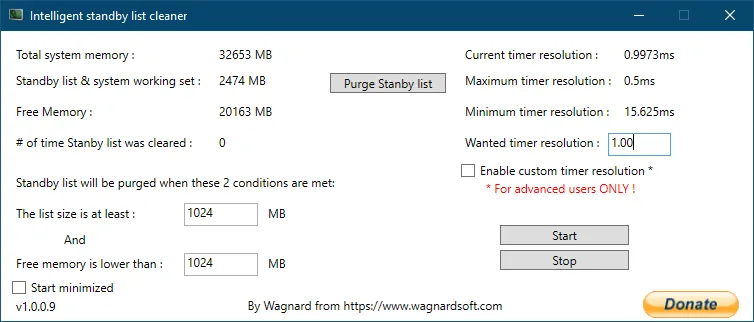
SHA-256 6292D1C55F671AEF93C4E8E2DF554753E7457B361771844FE92A812801956E3CIntelligent Standby List Cleaner is a small Windows utility that monitors the standby memory list and available system memory. Windows uses standby memory as a cache, and that cached data is normally useful because it can make repeated access faster. ISLC does not treat every byte of cached memory as a problem. Instead, it watches the two thresholds configured by the user and purges the standby list only when both conditions are met.
The utility became popular with PC gamers who were investigating intermittent stutter on Windows 10 and later versions. Some systems may feel more consistent when an unusually large standby list is cleared before available memory becomes constrained. That does not mean ISLC is a universal FPS booster. It cannot replace enough physical RAM, repair a slow drive, update a graphics driver or fix a game engine. Its job is narrower: monitor memory conditions and request a standby-list purge according to your settings.
ISLC also exposes timer-resolution controls intended for advanced users. Changing timer behavior can affect power use and application timing, so it should be treated as an optional setting rather than a required optimization. Start with memory monitoring, observe the results, and change one option at a time. The most useful setup is the one you can explain and reverse, not a copied preset with no connection to your PC.
For a trustworthy ISLC download, verify the publisher, version, package choice and SHA-256 before running anything. This guide links the files to Wagnardsoft, keeps portable and installer options separate, and explains what Intelligent Standby List Cleaner can and cannot change.
See standby-list size and available memory while ISLC evaluates the thresholds you configured.
The cleaner acts when both the standby-list and free-memory conditions are reached, avoiding constant manual purges.
View current, maximum and minimum timer resolution and optionally apply a custom target when you understand the tradeoff.
Run minimized in the system tray and let the monitor continue while you game or work.
Both official builds reach the same utility. After the ISLC download finishes, the difference is how the files are placed on your system.
Choose Portable if you want a self-contained folder, or Installer if you prefer a standard setup process. Do not download both unless you are comparing packaging.
The button opens a 15-second preparation countdown and then starts the verified Wagnardsoft file. Save the executable somewhere you can find it.
Compare the SHA-256 hash with the value displayed above or in the official release thread. Windows PowerShell can calculate a hash with Get-FileHash.
Run the portable self-extractor and choose a stable folder, or run the installer and follow its prompts. Avoid moving an active portable folder after startup tasks are configured.
Open ISLC, review the memory readings and confirm that monitoring works before enabling startup or changing timer resolution.
A publisher-hosted file and matching checksum improve provenance, but no website can guarantee that software is risk-free on every system. Keep Windows updated, review the digital prompts you receive, and create a restore point before system-level tuning.
ISLC evaluates two memory conditions: the standby list must be at least a chosen size, and free memory must be lower than another chosen size. A configuration copied from a 16 GB gaming PC may be inappropriate for a laptop with 8 GB or a workstation with 64 GB. Use Task Manager and ISLC to observe typical available memory before choosing thresholds.
Polling rate controls how often the application checks conditions. A shorter interval reacts sooner but wakes the process more often. For most users, stability and understandable behavior matter more than chasing the lowest possible number. Timer resolution is a separate advanced option; leave it disabled until you have a specific reason to test it and can compare behavior before and after.
Read the complete ISLC settings guideThe publisher positions ISLC for Windows 10 Creators Update and later Windows versions. Version history also contains Windows 11-specific timer-resolution fixes and options.
Use the current 1.0.4.8 build and read the ISLC download for Windows 11 guide before changing optional timer settings.
ISLC download for Windows 11ISLC was introduced for the Windows 10 Creators Update era and later. Run it with appropriate permissions and confirm monitoring values appear.
Follow the usage guideIf ISLC closes, shows zero values or fails to start at sign-in, use the official performance-counter and task-scheduler checks.
Open troubleshooting stepsThe current official forum post identifies version 1.0.4.8 as the active release and supplies two publisher-hosted downloads. The portable and installer files both returned successfully when checked on September 18, 2026. Wagnardsoft lists four changes for this version.
The main public content page can still display version 1.0.4.1 in its title, so the forum release thread is the more useful freshness source. This site records the checked date and uses the forum's current links and checksums rather than assuming the older article title is current.
See the complete ISLC version historyOfficial source checked September 18, 2026
Answers to the questions that matter before downloading or changing Windows memory settings.
The Wagnardsoft support thread still lists ISLC 1.0.4.8 as the current version. The portable and installer links, sizes and SHA-256 values on this page were checked on September 18, 2026.
Wagnardsoft distributes ISLC as a free Windows utility and accepts optional support. Version 1.0.4.8 adds license information and a third-party notices file.
The version history includes Windows 11-specific timer-resolution changes and fixes. Use the current build, start with conservative settings and read the Windows 11 guide before enabling custom timer behavior.
Choose portable if you want a self-contained folder and manual removal. Choose the installer if you prefer a conventional setup and installed-program workflow. Both files come from Wagnardsoft.
This site links to publisher-hosted files and displays the publisher's SHA-256 values, but it does not claim that any executable is universally risk-free. Verify the hash, keep Windows security active and download only from a source you trust.
ISLC is not a guaranteed FPS booster. It may help some systems where memory standby behavior is associated with stutter, but it cannot fix every game, driver, storage or hardware bottleneck. Compare repeatable gameplay before and after using it.
There is no universal best polling rate. A shorter interval checks more often, while a longer interval reduces wakeups. Begin with a moderate setting, confirm the monitor works and change only one variable at a time.
The download buttons point to publisher-hosted files on download.wagnardsoft.com. ISLC Download Wiki does not repackage or modify the executables and is not affiliated with Wagnardsoft.
Choose the portable or installer build. Both buttons use the current publisher-hosted Wagnardsoft files verified for this guide on September 18, 2026.
Your verified Wagnardsoft download will start in